Typing Posture That Stops Your WPM Dropping
Your speed falls off in the second half of a long test because your arms tire, not because your fingers do. Here is what to change.
TypingFastest Team
Typing speed & productivity experts • About us
In This Article
- 1. Quick answer
- 2. The drop is a stamina problem
- 3. Elbow height is the first thing to fix
- 4. The wrist angle nobody checks
- 5. Keyboard feet usually make it worse
- 6. Floating versus resting
- 7. Wrist rests are not wrist rests
- 8. Shoulders give you away
- 9. Monitor height changes your hands
- 10. Feet matter more than you'd think
- 11. The laptop problem
- 12. How to tell posture from technique
- 13. Warm up before the test that counts
- 14. Pain is a different conversation
- 15. What to change first, in order
- 16. What won't fix it
- 17. What to do now
- 18. Frequently Asked Questions
Quick answer
Quick answer: If your speed holds for thirty seconds and then falls, the problem is almost never your fingers. It's your forearms holding a position they can't hold, so the hands stop moving cleanly and errors climb.
Fix the elbow height and the wrist angle first. Those two carry most of it.
I counted our own posts on this site. Twenty seven titles are about hardware and eleven are about the body. That ratio is backwards.
The drop is a stamina problem
Watch your own numbers across a long test and the shape is usually the same. Strong start, decent middle, messy end.
People read that as concentration. It's usually the arms.
Typing fast means keeping your hands hovering in a precise place for minutes. That's a static load on the forearms and shoulders, and static loads tire fast.
Once they tire, your fingers land slightly off centre, and a slightly off centre key is an error.
Elbow height is the first thing to fix
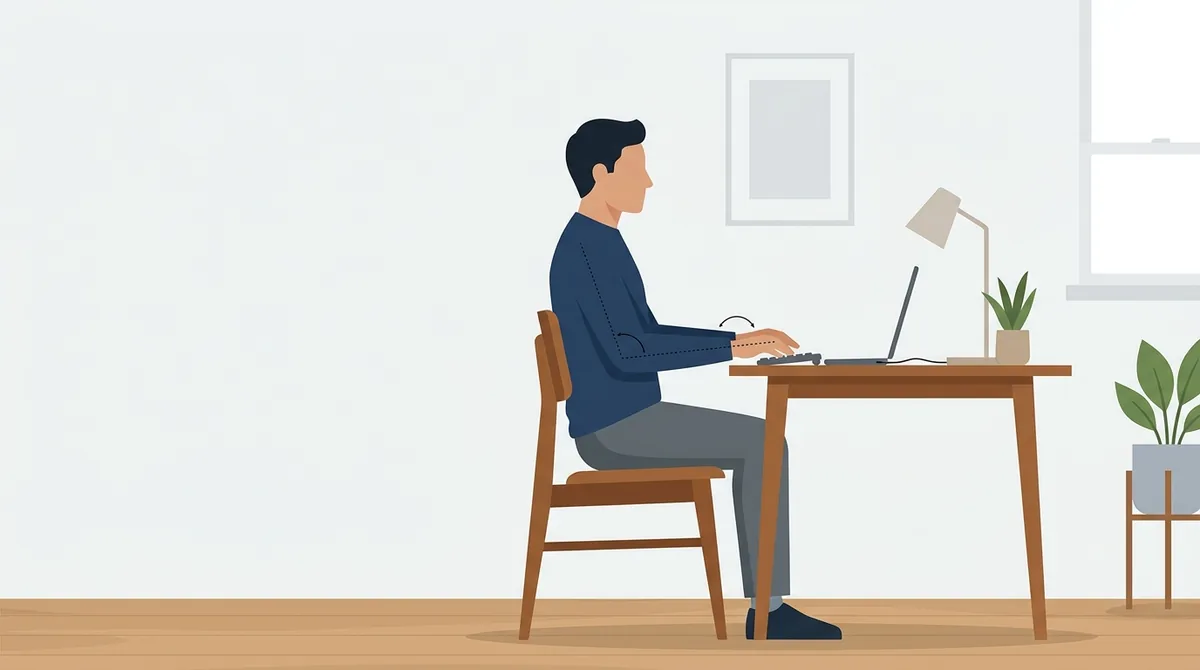
Your elbows want to sit at roughly the same height as the keyboard, or a touch above.
Too low and you're reaching up, which loads the shoulders. Too high and your wrists bend back, which is worse.
Most people get this wrong because they set chair height by their feet rather than their arms.
Set the chair for your elbows first. Then deal with your feet, with a box or a footrest if you need one.
The wrist angle nobody checks
Put your hands on the keyboard and look at them from the side.
If your wrists bend upward to reach the keys, your fingers are working against tension all the way through the test.
Flat is the target. A slight downward slope is fine, an upward bend is not.
This single angle is the difference between fingers that stay accurate at minute four and fingers that start missing at minute two.
Keyboard feet usually make it worse
Almost every keyboard has little legs at the back, and almost everyone flips them out.
They tilt the board towards you, which forces your wrists into exactly the upward bend you're trying to avoid.
They exist so you can read the legends, which matters if you look at the keys. If you touch type, you don't.
Fold them down and type for a week. Most people never put them back up.
Floating versus resting
There are two schools and they both work, but mixing them doesn't.
Floating means your wrists stay off the desk and your whole hand moves. It's faster and it's more tiring.
Resting means your wrists sit down and your fingers stretch. It's steadier and it limits your reach.
Pick one and stay with it for a whole session. Drifting between them mid test is where a lot of late test errors come from.
Wrist rests are not wrist rests
The name causes the damage. A wrist rest is meant for the pause between bursts, not for typing on.
Parking your wrists on one while you type pins your hands in place and makes your fingers do all the reaching.
That's the opposite of what you want at speed.
We went through the evidence on this in our piece on whether wrist rests help you type faster, and the short answer is that it depends entirely on when you use it.
Shoulders give you away
Here's a test you can run right now. Type for thirty seconds, then notice where your shoulders are.
If they've crept up towards your ears, that's the tension you'll pay for at the end of the test.
It usually comes from a desk that's too high or a chair with no arm support.
Drop your shoulders deliberately every minute or so. It feels silly and it works.
Monitor height changes your hands
This one seems unrelated and it isn't.
A screen that's too low pulls your head forward. A forward head puts load through the neck and shoulders, and that load runs straight down into your arms.
So a badly placed monitor makes your hands worse, even though your hands never touch it.
Top of the screen at roughly eye level is the usual advice, and it holds up here.
Feet matter more than you'd think
If your feet dangle, your legs pull you forward in the chair and your back stops being supported.
Within a few minutes you're perched rather than seated, and perching means your arms are holding you up.
Flat feet, whole foot on the floor or a box. That's it.
It's the cheapest fix in this entire list and the one most people skip.
The laptop problem
A laptop puts the screen and the keyboard in the same place, and they want to be in different places.
So you either look down and hurt your neck, or you raise the screen and put the keyboard too high.
There's no posture that solves both at once.
If you do serious typing on a laptop, a separate keyboard is the single biggest upgrade available, and it costs less than most keycap sets.
How to tell posture from technique
There's a simple test if you're not sure which one is costing you.
Run a short test, rest two minutes, then run another. If the second one is as fast as the first, your technique is fine and stamina is the problem.
If both are equally slow from the first word, it's technique and posture won't save you.
Our practice mode is the right place to run that pair, because you can pick the length.
Warm up before the test that counts
Cold hands are slow hands, and the first thirty seconds of any session is a warm up whether you planned it or not.
So do the warm up somewhere that doesn't count, then take your real attempt.
This is worth two or three words a minute on its own for most people.
We laid out a short routine in our typing warm up guide, and it takes under two minutes.
Pain is a different conversation
Everything above is about speed. If you have actual pain, tingling or numbness, that's not a speed problem and it doesn't belong in a typing blog.
I read the plain summary on repetitive strain injury before writing this part. It names long periods of repetitive motion in a fixed posture as the cause, and it lists aching, tingling and weakness that starts out coming and going.
That pattern of on and off discomfort is the bit people ignore, because it stops on its own for a while.
Stop, change the setup, and see someone if it persists. No words per minute figure is worth a hand that stops working.
What to change first, in order
Don't do all of this at once. Change one thing and give it a few days:
- Chair height, set by your elbows rather than your feet.
- Keyboard feet folded down.
- Wrists flat, not bent upward.
- Feet flat on the floor or a box.
- Monitor raised so you stop looking down.
That order is roughly biggest effect first.
What won't fix it
A new keyboard won't. A new switch type won't. Neither will keycaps, a mat, or a different desk colour.
Those things change how typing feels, and feel matters for enjoyment. They don't change how long your forearms can hold a position.
Our full ergonomic setup guide covers the gear side properly if you want it.
But the free changes come first, because they're the ones doing the work.
What to do now
Sit down, put your hands on the keyboard and look at your wrists from the side. If they bend up, that's your first fix.
Fold the keyboard feet down. Set the chair by your elbows.
Then run a two minute test, rest, and run another. Compare the two halves of each rather than the overall number.
That comparison tells you whether any of this is your problem at all.
Frequently Asked Questions
Why does my typing speed drop halfway through a test?
Usually because your forearms and shoulders are holding a static position and getting tired, not because your fingers are. Tired arms land your fingers slightly off centre, and off centre keys become errors. Fixing elbow height and wrist angle handles most of it.
Should I use the little legs on the back of my keyboard?
Probably not. They tilt the board towards you and push your wrists into an upward bend, which is the angle that tires your hands fastest. They exist so you can read the key legends, which only matters if you look at the keys.
Should my wrists rest on the desk while typing?
Pick one style and stay with it. Floating keeps your wrists up and moves the whole hand, which is faster and more tiring. Resting is steadier and limits reach. Drifting between the two mid test is where a lot of late errors come from.
How high should my chair be for typing?
Set it so your elbows sit at about the same height as the keyboard, or slightly above. Most people set chair height by their feet instead, which is why the arms end up wrong. Deal with your feet afterwards using a box if needed.
Does monitor height affect typing speed?
Indirectly, yes. A screen that is too low pulls your head forward, which loads the neck and shoulders, and that load runs down into your arms. Raising the screen so the top is near eye level takes tension out of your hands.
How do I know if posture or technique is slowing me down?
Run a short test, rest two minutes, then run another. If the second is as fast as the first, technique is fine and stamina is the issue. If both are slow from the first word, it is technique. You can run that pair on our typing test.
Ready to Test Your Typing Speed?
Take a free typing test, practice touch typing, or race against others in real-time multiplayer races.
Start Typing Test →Related Articles
Does a Dirty Keyboard Slow Your Typing Down
One sticky key costs you more than a whole grade of keyboard. Here's what dirt actually does to typing, and the cleaning order that fixes it.
Blank Keycaps: What They Do to Your Speed
Blank keys don't make you faster. They make you find out whether you were really touch typing, which is a different and more useful thing.
Does Typing Speed Drop Late at Night
Your fingers follow the same daily clock as your reaction time. Here's when typing speed peaks, when it collapses, and how much of it you can shift.